Blog / Passport BMW News

Blog

All Passport BMW News Marlow Heights BMW Dealer Marlow Heights BMW Service BMW Information Marlow Heights Used Cars
Screen Shot 2021-01-21 at 3.58.13 PM

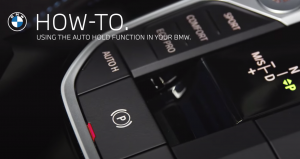
Learn how to use the Auto Hold function of your parking brake in your BMW

In this video below, BMW How-To shows you how to use the Auto Hold function of your parking brake. The parking brake is used to prevent your BMW from rolling when it is parked. Additionally, Automatic Hold is available on BMWs with a Steptronic transmission. The system provides assistance by automatically applying and releasing the brake, for example in stop-and-go traffic or preventing the vehicle from rolling back on sloping ground. In order to activate Automatic Hold, the car needs to be in drive-ready state. Press the button on the middle console, the LED is illuminated. In the instrument cluster, the indicator lamp illuminates green (AUTO H). Once the brake has been applied, the vehicle is secured from rolling as soon as the indicator light is illuminated green. To drive off, press the accelerator pedal. The brake is released automatically and the indicator lamp for the parking brake is no longer illuminated. When the vehicle is being held by Automatic Hold and drive-ready state is switched off or the vehicle is exited, the parking brake is automatically applied. The indicator lamp for the parking brake switches from green to red.

Screen Shot 2021-01-19 at 10.43.41 AM

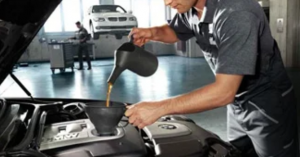
Don't Miss The Works Oil Special Going On Now at Passport BMW

The Works Oil Special $99.99 $129.99 for 8 cylinder Regular price: $129.99 for 6 cylinder, $159.99 for 8 cylinder. Includes: • Oil change for up to 6 liters of Pennzoil synthetic oil • Fluid check (power steering, coolant, brake and washer fluid) • Multi-point inspection • Tire wear and air pressure inspection • Exterior wash and interior vacuum Excludes M models and 12 cylinder vehicles. Prices include oil, parts labor. Valid at Passport BMW. Specials do not include tax, shop supplies or disposal fees. Cannot combine with other coupons, discounts or sale items. Must be used at time of write-up.

P90411054_highRes__mid

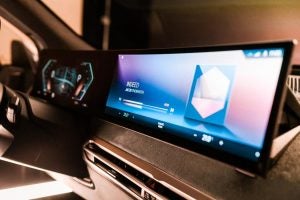
BMW announces the future of the display and operating system BMW iDrive

BMW announces the future of the display and operating system BMW iDrive at CES 2021. When launched, iDrive delivered a paradigm shift in the interaction between driver and vehicle became an industry standard and laid the foundations for today’s multifunctional, online-based user experience. 20 years have passed since the first generation of BMW iDrive made its debut. Now, at the Consumer Electronics Show (CES) 2021, BMW is announcing the next chapter in its display and operating system, which is set to transport driver-vehicle interaction into a new digital and intelligent age. BMW is utilizing the virtual forum the event provides to give a global audience an initial preview of its upcoming all-new BMW iDrive system, which will be officially unveiled later in 2021. more BMW’s digital offering at CES 2021 also includes a teaser video that visualizes the development of the user experience inside a BMW over the last two decades. The protagonists in this journey through time are the 2001 BMW 7 Series – in which the BMW iDrive system celebrated its premiere – and the upcoming BMW iX, where the new generation of the display and operating system will be available for the first time. Additionally, the BMW Design team responsible for user experience and user interaction has provided a behind the scenes glimpse of its development work. To this end, another episode has been added to the “Re-Thinking Design” video series launched as part of the BMW Group’s #NEXTGen 2020 event. All the content from BMW’s presence at CES 2021 and further digital presentations can be viewed in a special CES feature on the online platform at www.bmw.com/ces. 20 years ago, BMW launched a paradigm shift that reversed the wave of buttons spreading over car interiors at the time. The BMW iDrive operating system introduced in the then new BMW 7 Series in 2001 swept away old habits and purged the cockpit of more buttons and controls. In their place came a color screen in the instrument panel (the Control Display) and a rotary dial on the center console (the iDrive Controller). This multifunctional system allowed drivers to control a large number of vehicle settings, entertainment, navigation and telecommunications functions with a single operating tool. Furthermore, the BMW 7 Series was the first car to feature voice control technology, which allowed selected functions to be activated using spoken commands. iDrive’s controller and voice control made operating the car’s systems significantly easier and safer. Where the driver previously had to find and engage a different dedicated button in the cockpit for each individual function, now they could keep their hand in one place on the Controller, which occupied an ergonomically ideal location on the center console. Various functions could be controlled using standard rotary, pressure and shift movements. Furthermore, the driver could view the information on the Control Display – integrated into the center of the instrument panel at eye level – equally quickly and safely; they only needed to divert their gaze from the road for a short moment to check the operating status of systems. After just a few years, this innovative principle morphed into the new industry standard. A host of other carmakers adopted the combination of display and controller, the only way to harness the ever-increasing array of functions inside their models. Ongoing development widens the gap. Since the advent of iDrive, BMW has consistently taken the lead in the field of intuitive in-car operation, a constant process of building its superiority over competitors’ systems all the time. This has led to the introduction of “favorites” buttons to store individually selected operating steps. These buttons debuted capacitive surfaces, which previewed functions on the Control Display. After that came direct selection buttons enabling a direct route to the most frequently used function areas of the menu and a Touch Controller, which allowed the user to input characters directly. 2015 brought the arrival of the Control Display with touch control, again in the BMW 7 Series. At the same time, BMW innovated further to optimize driving comfort and safety. In 2004 it added a Head-Up Display, which projected relevant driving information onto the windscreen in the driver’s direct line of sight. And multimodal operation reached another new level in 2015 with the world premiere of BMW Gesture Control in the 7 Series. Voice control has also undergone a sustained process of evolution. Indeed, since 2015 natural language understanding has enabled systems to be operated using naturally spoken instructions instead of pre-set commands. BMW continues to lead the way in the field of connected vehicles. BMW iDrive also paved the way for the introduction of digital services, which have enabled the consistent progression of the relationship between user and car. The first development stage of the system brought the BMW Online service into BMW vehicles. Integration of the Google search engine followed in 2007, before BMW became the first vehicle manufacturer worldwide to unlock unlimited in-car internet access the following year. In response to the boom in smartphones – and the digital applications developed specially for them – apps from third parties could also be integrated into the BMW iDrive operating system from 2012. The connection between the vehicle and driver became even closer in 2016. The BMW Connected app now allowed customers to fully integrate their car into their digital lifestyle. Destinations inputted into a navigation app could be imported directly from a smartphone into a BMW, while information on the status of the car was also accessible on a mobile phone or other digital device. This service now offers an even wider range of functionality via the My BMW app. Assisting drivers with digital intelligence. A new online-based voice control system premiered in 2018 in the newly launched BMW 3 Series. The BMW Intelligent Personal Assistant is a digital companion whose skillset can be constantly expanded. It is underpinned by the modular and flexible BMW Operating System 7 vehicle software, which also provides the basis for another, particularly future-focused service: Remote Software Upgrade keeps the BMW up to date with the latest digital technology at all times and also enables additional functions to be integrated into the car at a later stage. 20 years ago, the boldness to explore a revolutionary response to the challenge of ever increasingly functional complexity drove BMW to pioneer intuitive on-board operation. And the BMW iDrive system also set the course for digital intelligence, which allows the driving experience to be tailored even more precisely to the customer’s needs and preferences. The next generation of BMW iDrive takes the burgeoning relationship between a BMW and its driver to a new level. The new system neatly bridges the gap between analogue and digital technology. And this, in turn, heralds another paradigm shift, as the number of available functions in a car and their complexity continue along a constant upward curve. Digital intelligence has been introduced into cars, and optimized sensors now allowing them to perceive and analyze their surroundings. As a result, elements of driving and parking can be automated to an increasing degree, while cloud-based services dip into an ever-growing pool of real-time data. This means that in many situations, the vehicle has access to a greater supply of information than the driver. For example, it can receive and display hazard warnings from other BMW vehicles and make predictions on the availability of parking spaces at a destination. Developments will continue in this direction, presenting the car’s display and operating system with fresh challenges now and in the future. The next-generation BMW iDrive is set up to utilize the potential of an intelligently connected vehicle more extensively than ever and thus make the mobility experience even safer, even more comfortable and convenient, and even richer in variety.


X1 $459/mo.

Drive a new BMW X1 for only $459 per month from Passport BMW

Lease a 2021 BMW X1 xDrive28i for only $459 per month. Click here to view our current X1 inventory. Monthly lease payments of $459 per month for 36 months is based on an adjusted capitalized cost of $37,205 (MSRP of $39,495, including destination and handling fee of $995, less $1,615 capitalized cost reduction, $0 security deposit and suggested dealer contribution of $175 and $500 Lease Credit). Actual MSRP and dealer contribution may vary and could affect your monthly lease payment. Cash due at signing includes $1,615 capitalized cost reduction, $459 first month's payment, $925 acquisition fee and $0 security deposit. Lessee responsible for insurance during the lease term, excess wear and tear as defined in the lease contract, $0.25/mile over 30,000 miles and a disposition fee of $350 at lease end. Not all customers will qualify for security deposit waiver. Tax, title, license, registration and dealer fees are additional fees due at signing. Advertised payment does not include applicable taxes. Purchase option at lease end, excluding tax, title and government fees, is $22,512. Offer valid through February 01, 2021 and may be combined with other offers unless otherwise stated. Models pictured may be shown with metallic paint and/or additional accessories.

BMW-2018-Connected-Drive-WiFi2

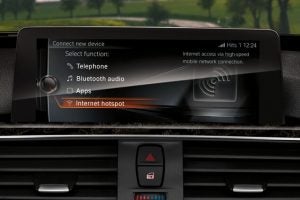
Connect your devices through your BMW to work on emails, stream music and videos, and much more

WiFi Hotspot Connect almost anywhere, literally. With a Wifi Hotspot onboard, you can connect your devices through your car to work on emails, stream music and videos, and much more. GET STARTED. BMW INTERNET HOTSPOT. 1. Navigate to “Communication” menu in iDrive. Then, select “Manage mobile devices” followed by “Connect new Device.” Select “Internet hotspot.” 2. Your hotspot name and a case-sensitive key, or password, will be displayed. The default hotspot name is “My BMW Hotspot ####”. The vehicle’s Internet hotspot network is now discoverable for 120 seconds. 3. From your device, search for the vehicle’s hotspot by its name and connect to it by entering the hotspot key when prompted on your device. more FREQUENTLY ASKED QUESTIONS. 1. What are the requirements to use the Internet hotspot in my BMW? In order to use the Internet hotspot, your vehicle must have an active BMW ConnectedDrive subscription and you must register for a Trial data plan (see #3 below). This must be done inside the vehicle. If you are unsure if you have an active ConnectedDrive subscription, please call 1-888-333-6118 or visit your local BMW center. Once active, the Internet hotspot can be used by following the steps in the “Getting Connected” section above. 2. While trying to sign up via myvehicle.att.com, it asks for my “Vehicle Mobile Number.” Where can I find this information? For vehicles equipped with Internet Hotspot, the vehicle mobile number can be found on the main status page of the My BMW ConnectedDrive Portal www.bmwusa.com/MyBMWConnectedDrive. 3. Do I need a mobile data plan subscription in order to use the Internet hotspot? Each vehicle receives a trial subscription of 3GB or 3 Months, whichever comes first. Additional data plans are available for purchase.1 You will be prompted on your device to register for your trial data plan. When you reach your trial limit, you will receive a page on your connected device with instructions on how to sign up for additional data plans. 4. Can I use the Internet hotspot when away from my vehicle? No. The Internet hotspot is intended for use inside of the vehicle. Additionally, for security purposes, the Internet hotspot is not available beyond 5 feet from the vehicle. 5. How many devices can be connected to the hotspot at one time? Up to 8 devices can be connected simultaneously. All devices connected to the hotspot will use data from your wireless data plan. 6. There are multiple hotspot names shown on the ConnectedDrive Connections menu. Which is the one to connect to? The default name of hotspot is “My BMW Hotspot” ending with the last 4 digits of the personalized VIN number of your vehicle. Make sure you don’t connect to the other WiFi network also available in the vehicle (with a name starting with “DIRECT…”) 7. Why is the WiFi network not listed on my mobile device as an available network to join? In this case, please make sure the hotspot is not hidden. Go to “Manage mobile devices,” click on the iDrive’s “option” button on the bottom right of the dial. At the bottom of the screen ensure “Hide hotspot” is not checked 1 Cellular data connectivity and data plans are provided by AT&T Mobility LLC. You do not have to be an existing AT&T Mobility customer to purchase a data plan. Standalone mobile data plans are available for purchase. Existing AT&T Mobility customers with a Mobile Share plan also have the option of adding their vehicle to their plan. Visit myvehicle.att.com for more information or call 866-595-1222 . LTE coverage is not available everywhere.

Screen Shot 2021-01-05 at 9.24.34 AM

How to adjust your BMW's interior temperature with auxiliary ventilation

In this video BMW How-To shows you that, depending on model and country, with the optional equipment ‘Automatic air conditioning’, auxiliary ventilation is included. The independent ventilation allows the temperature of the interior to be adjusted before the journey starts, using power from the vehicle’s battery. Depending on the set temperature and ambient temperature, the interior is ventilated or heated using any available residual heat from the engine. The system can be switched on and off directly or for a preselected departure time. In order to set and activate a departure time, go to “CAR”, “Settings”, “Climate comfort”, “Auxiliary ventilation”, “Departure schedule” and select the required departure time. Set the departure time and select the day of the week if necessary. After activating the required departure time, the fan and time symbol on the climate display signals that a departure time has been activated. At least 10 minutes should pass between adjusting/activating the departure time and the scheduled departure time, so the climate control has enough time to work. In the My BMW App the system can be switched on and off directly as well, by clicking on the fan symbol and pressing “Start”. The system switches off automatically after a while.

passportBMW

Happy New Year from all of us at Passport BMW

Thank you for being a customer at Passport BMW. We look forward to serving you in 2021. We wish you peace, happiness, and an abundance of good health this new year.

PassportAutobanners-delivery

PASSPORT BMW DELIVERS! Home or Office Appointments!

We can come to you! We can come to your home or office (within 30 miles of our store) for a demonstration, test drive and/or delivery! We offer off-site demonstration, test drive and home delivery to local Virginia, D.C. and Maryland customers for almost 20 years! Many of our customers have never visited our location before taking delivery. Simply ask and we can customize an experience that fits your lifestyle and schedule. CALL TODAY TO SCHEDULE: Passport BMW 301-702-5785

passportBMWxmas

All of us at Passport BMW join in wishing you a Merry Christmas

During the Holiday Season more than ever, our thoughts turn gracefully to those who have made our progress possible. We would like to say Thank You and Best Wishes for the Holiday Season, Happy New Year!

bmwholidayhours

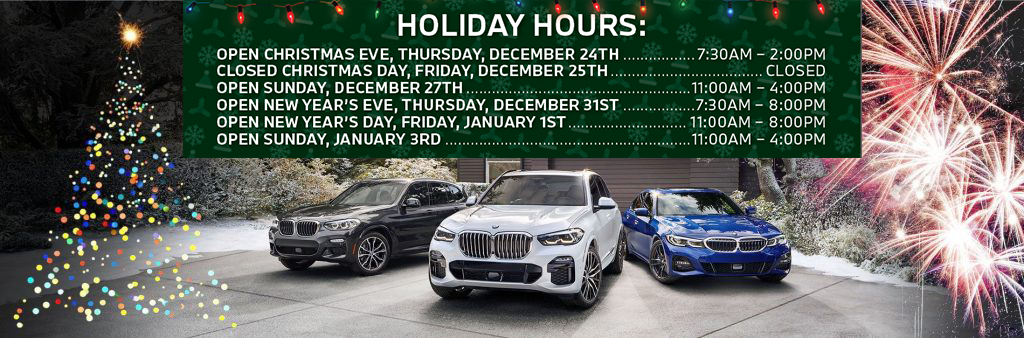
Take note on our Passport BMW Holiday Hours

Open Christmas Eve, Thursday, December 24TH....7:30AM-2:00PM Closed Christmas Day, Friday, December 25TH....CLOSED Open Sunday, December 27TH....11:00AM-4:00PM Open New Year's Eve, Thursday, December 31ST....7:30AM-8:00PM Open New Year's Day, Friday, January 1ST....11:00AM-8:00PM Open Sunday, January 3RD....11:00AM-4:00PM

appleplaybmw

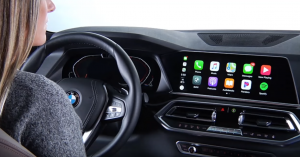
How to Use Apple CarPlay in your BMW

Available as part of BMW ConnectedDrive, Apple CarPlay seamlessly integrates your iPhone with BMW’s iDrive 7 Operating System. Receive messages, answer calls, navigate using Apple Maps, and stream music - all with our smart car technology via the center display of your BMW luxury vehicle. Focus on the experience of driving your BMW and let our smart vehicle technology handle connecting you to your next destination.

BMW approved tires

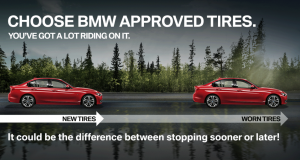
Optimize your driving experience with a set of BMW Approved Tires from the Passport BMW tire shop

BMW APPROVED WHEELS AND TIRES. Though you can’t anticipate everything that happens on the road, you can equip your BMW with premium tires that are ready for the various challenges that may come your way. With performance in mind, BMW Approved Tires are designed and manufactured to exacting standards. Extensively tested and specifically matched to individual BMW models, BMW Approved Tires are crafted to deliver superior handling with the solid acceleration, crisp cornering, and smooth braking you expect from your BMW. Optimize your driving experience with a set of BMW Approved Tires. more YOU CAN’T MISS THEM ALL. YOU MAY BE COVERED WITH ROAD HAZARD TIRE COVERAGE. Nails, potholes, and other road hazards can cause serious and costly damage to your tires. Now, eligible tires purchased at a participating BMW Center will have complimentary Road Hazard Tire Coverage for the first year. BMW APPROVED ALL-SEASON TIRES • Detailed tread configurations and premium rubber compounds offer versatility and value • Designed for a comfortable ride year-round in moderate climates • Not recommended in driving conditions with temperatures below 45° BMW APPROVED PERFORMANCE TIRES • Low profile, stiff sidewalls and softer rubber compounds improve traction and cornering performance • Shallow water channels provide more tread surface area but sacrifices wet weather handling • Resistant to heat build-up especially in hot climate conditions BMW APPROVED COLD WEATHER TIRES • Special rubber compounds enable treads to remain soft and flexible at temperatures below 45°F • More aggressive tread pattern maximizes road contact and traction • Sharper edges and closer spacing allow for better grip on snow and ice ROAD HAZARD TIRE COVERAGE • The road can be tough on your tires – but with Road Hazard Tire Coverage you may be covered • With a nationwide network of participating BMW Tire Centers, getting your eligible damaged tires replaced has never been easier • Efficient claims process to facilitate tire exchanges to get you back on the road BMW APPROVED COMPLETE ACCESSORY WHEEL AND TIRE SETS • The maximum BMW Approved wheel & tire size available for your specific vehicle • Multiple surfaces and finishes are usually available • High speed mounted and balanced • Excellent handling and ride comfort Click here to visit the BMW tire center

Contact Us

Fill out this form below and we'll contact you shortly
*Required Fields